
Amazon SES's mailbox simulator tests how your application handles predefined delivery events. It does not show where Gmail, Outlook, or another provider places your email. To check that, send an original message through your actual SES sending route to LDM's test addresses, then inspect the observed folders. Use both tests because they answer different questions.
A receipt can pass an application test while its real counterpart reaches a secondary folder or Spam. Equally, an absent test message may never have left the application. Good diagnosis starts by separating three questions: did the application construct the intended message, did the sending system attempt delivery, and where was a received copy observed?
This guide describes a bounded test you control. It does not assume a native connection between Amazon SES and LDM, and it does not report results from a completed experiment.
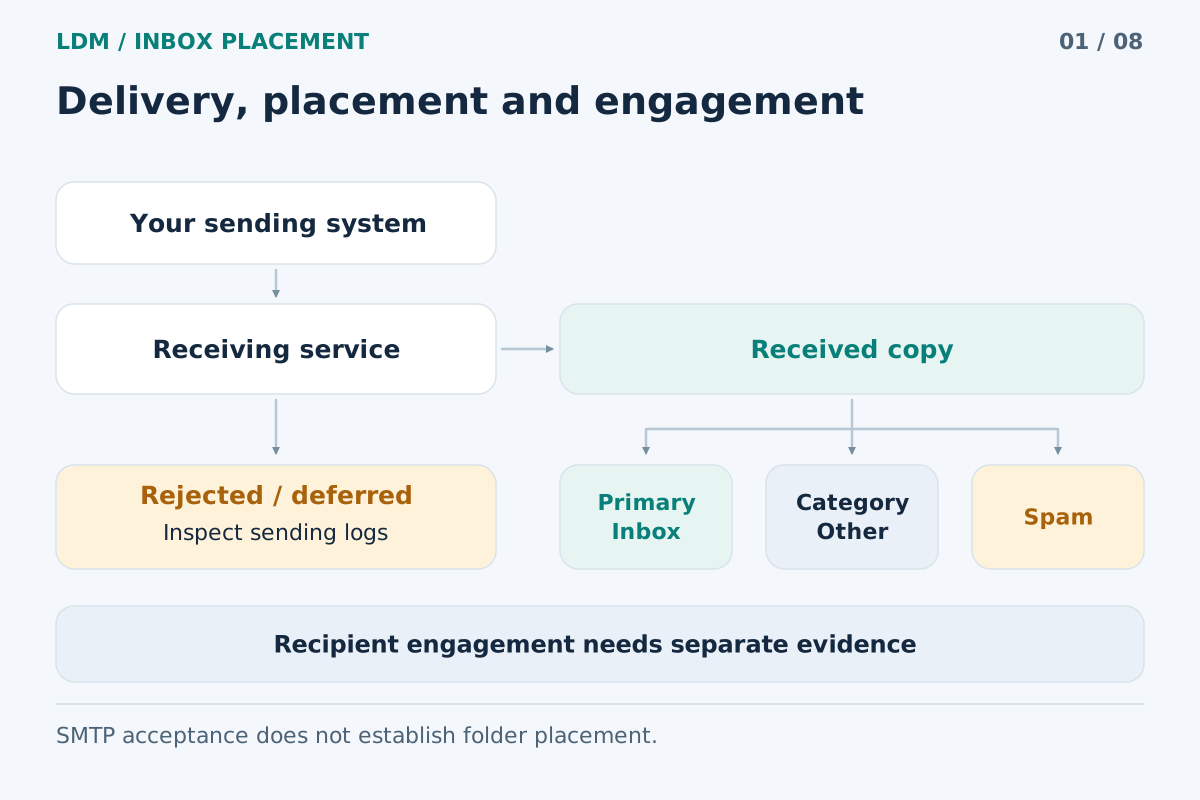
Transport, folder placement and engagement are separate observations.
What the SES mailbox simulator establishes
AWS provides simulator recipients for scenarios including successful delivery, a bounce, a complaint, and an automatic response. For example, success@simulator.amazonses.com exercises the successful-delivery scenario. These addresses must receive the message through SES. See the official SES simulator documentation.
Use these scenarios to examine your own handling of events. Does a notification reach the intended consumer? Does the application associate it with the correct job? Does a simulated bounce produce the expected internal action? Those are useful engineering checks, but a predefined simulator response cannot establish a placement decision at an external mailbox.
Keep the resulting evidence separate. A record saying “bounce handler passed” should identify the simulator scenario. A record saying “copy found in Inbox” should identify an actual recipient observation and its time.
Check the SES sandbox restriction before planning a seed test
The SES account sandbox and the mailbox simulator are different concepts. AWS states that sandbox status is specific to an AWS Region. While an account is in the sandbox, recipients must be verified addresses or domains, except for the simulator. Production access removes that recipient restriction; sender identity requirements still apply. These rules are documented in Request production access.
An LDM seed address is an external recipient, not an SES simulator address. Do not assume that entering it in a request makes a sandbox account eligible to send to it. Check the sending Region and account permissions first. Where the restriction prevents a legitimate test, complete AWS's supported production-access process before proceeding. Do not attempt to work around verification requirements.
A practical workflow for SES and LDM
1. Define the message and the question
Choose one real message type: an order receipt, an account notification, or a permission-based newsletter. Write down the question before changing anything. “Where does this receipt land through our current route?” is a useful starting point. “Is SES good?” is too broad for a small test.
Prepare realistic, non-sensitive fixture data. Keep the final subject, HTML, plain-text part, attachment behavior, and links representative of the intended message. Preserve required unsubscribe links and headers for the message type.
2. Record the route you intend to test
Note the AWS Region, sending identity, application environment, and whether the application submits through SMTP or the API. Record any configuration-set or routing choices your application actually uses, together with its template version and tracking settings.
These notes prevent an apparently successful manual test from being attributed to a different application route. Sending a hand-written message from a console can be useful, but it does not automatically reproduce the email assembled by your application's renderer and queue worker.
3. Complete event-handling tests separately
Run the simulator scenarios relevant to your application and inspect the resulting application behavior. Record them as simulator tests. Do not mix simulator addresses and LDM recipients into one result set: the two groups answer different questions.
Once that layer is understood, prepare a separate, explicitly bounded real send. Leave unrelated development jobs and scheduled campaigns outside the test.
4. Obtain the current LDM test recipients
Start a test with the sender address at LDM Inbox Placement, then use the addresses supplied for that test. Follow the LDM methodology when interpreting its report.
Use a temporary recipient set that cannot enter an ongoing campaign. Do not add seed addresses to warmup activity, permanent subscriber lists, or recurring automations. Check that your account and sending workflow permit the test.
5. Send the original message through the intended route
Have the application generate a fresh original message for the test recipients. Do not forward a copy from your personal mailbox: that introduces another sending path and a different message context.
Use the normal rendering and submission logic, with the test recipient set substituted deliberately. Preserve relevant headers and unsubscribe mechanisms. Save the application's job reference, submission outcome, timestamps, and available message identifiers. Stop the bounded job once the intended messages have been submitted.
6. Reconcile sender evidence with mailbox observations
Read the sending record before interpreting an absent copy. A submission error, a later delivery problem, and an unavailable mailbox observation require different investigations.
In LDM, Missing or unknown does not mean Spam. Promotions and similar categories are received locations, distinct from the primary Inbox and from Spam. Its 24-hour observation follows the same received copy; it does not send another message at each checkpoint. Retain the folder and measurement time together.
Hypothetical diagnostic example
Suppose a team tests an order-receipt workflow. The simulator confirms that its event consumer processes a successful-delivery notification. A separate real test then produces six selected external mailboxes: three copies in the primary Inbox, one in Promotions, one in Spam, and one not found.
Those are hypothetical numbers, not an SES benchmark. Five copies were received. Under LDM's published calculation, the primary-Inbox share is three divided by five, or 60%; coverage is five received copies out of six selected mailboxes. Reporting only “60% deliverability” would hide both the denominator and the missing observation.
The next investigation has two branches. Check sender-side evidence for the missing copy. Separately inspect the received Spam copy and its available authentication evidence. Neither branch justifies rewriting all the email content immediately.
What this test cannot establish
A small seed test does not represent every customer's history, mailbox rules, or future interaction. It also cannot prove that one word, one link, or SES itself caused a placement result. A successful authentication result and an Inbox observation answer different questions.
For a follow-up experiment, keep a baseline and change one relevant variable when practical. Record what changed and when. A later result from a new message belongs to a new send, whereas a later observation of the original copy belongs to its existing history.
Frequently asked questions
Does a successful simulator result mean my email reached Gmail's Inbox?
No. It confirms the selected simulated scenario. You need an actual message sent to an external mailbox and a corresponding folder observation to describe that mailbox's placement.
Can I use LDM while my SES account is in the sandbox?
Only if the proposed recipients satisfy the applicable SES recipient restrictions. Ordinary LDM addresses are not simulator addresses. Check the account's status in the Region used for the send and follow AWS's supported access process.
Should I use the SES console or my application?
Use the route that answers your question. For an application-generated receipt, exercise the application's actual rendering and sending path. Label any console-only experiment separately so its result is not attributed to an untested workflow.
Should I remove tracking or unsubscribe links to improve the result?
Keep the first test representative. Preserve required unsubscribe features. If an optional tracking change is relevant, compare a separately documented variant; one improved observation does not prove a universal cause.
How should I report a result that changes later?
Report the confirmed sequence and timestamps. Do not assume the copy stayed in one folder between checks, and do not interpret a later observation error as proof of its current location.
Test the route your application actually uses
Create an LDM inbox placement test after confirming that your SES account can make the permitted real send. Keep simulator evidence, sender logs, and observed mailbox folders together in your test record.