
SendGrid Sandbox Mode validates a Mail Send API request without delivering an email. It cannot establish Inbox or Spam placement. For that measurement, make a permitted live send through your actual sending route to LDM's test addresses. Keep request validation, sending events, and observed mailbox folders separate so that a successful API test is not mistaken for delivery.
“The API returned success, but the test inbox is empty” can describe an entirely expected outcome. Before investigating authentication or changing a subject line, determine which kind of success the application recorded. A valid request, an accepted live submission, and a copy found in a particular folder are three different pieces of evidence.
This workflow combines SendGrid's documented request validation with a separate mailbox observation. It does not require or claim a native SendGrid–LDM integration.
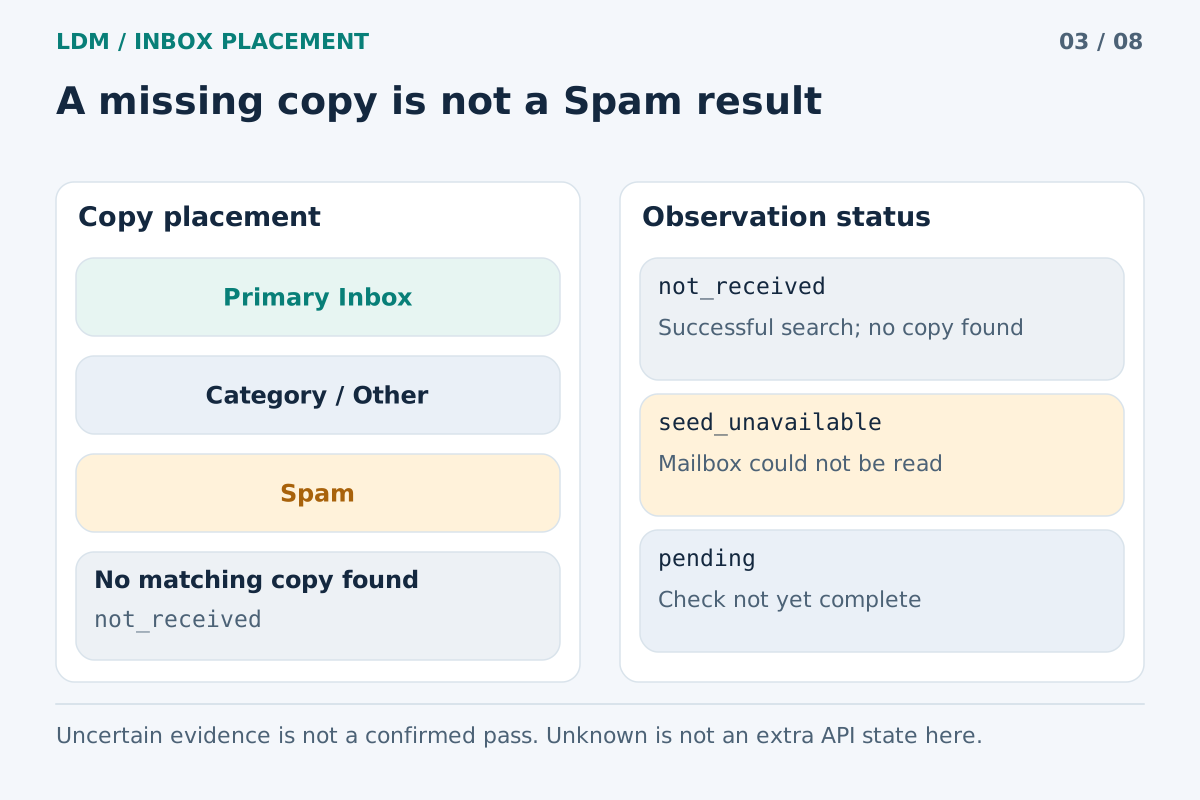
No copy found after a successful search differs from an unavailable mailbox or pending check.
What Sandbox Mode actually checks
SendGrid documents Sandbox Mode as a Mail Send setting under mail_settings. It validates the request's structure and parameter types. A successful sandbox validation returns 200 OK; successful non-sandbox submission normally returns 202 Accepted. Sandbox requests do not deliver messages or generate Event Webhook and Email Activity events. The official Sandbox Mode documentation explains these distinctions.
There is also a template limitation: when a request contains template_id, sandbox validation assumes the template contains the subject and body; it does not validate that content. Request validity is therefore an incomplete answer even to the question “Is the finished message correct?”
Use validation to catch integration errors early. Then inspect rendered content and, when appropriate, perform a bounded live send to measure the next stages.
Prepare a controlled transition to live sending
Avoid turning off a development safeguard globally just to obtain one placement result. Identify the exact request or isolated job that will send the test message, and explicitly limit its recipients to the addresses issued for that test.
Before submitting it, record the sender, application environment, template version, personalization data, tracking choices, and sending account or subuser if your setup uses one. Keep secrets out of the record. For comparison work, save enough configuration detail to reproduce the message without copying an API key into a report.
Use representative fixture data rather than a customer's private information. Preserve required unsubscribe behavior and headers. A promotional template stripped of its normal footer is a different message, so it is a poor baseline for evaluating the campaign you actually intend to send.
Run the test in six steps
1. Validate the intended request
Run the sandbox validation for the message you plan to test. Investigate structural errors before moving on. Separately review the actual template output with the same fixture data, including the subject, plain-text alternative, important links, and any conditional sections.
Record this stage as request and content validation. Do not label it “delivered,” even if your application currently uses that word for every successful HTTP response.
2. Choose the route that represents production
If the application sends through the Mail Send API, use that application path. If it normally submits through SMTP, test the real SMTP path instead. An API experiment can be useful, but it cannot automatically stand in for an SMTP job with different headers or content construction.
The relevant question is whether the test preserves the behavior being evaluated. Match the sender identity, rendering logic, link handling, and applicable route configuration. Record any intentional differences.
3. Create a separate LDM test
Enter the actual sender address at LDM Inbox Placement and obtain the current test recipients. Treat that set as temporary. Do not import it into a permanent audience, a warmup pool, or a sequence that will continue sending after the measurement.
Confirm that the test complies with your account's sending permissions and the relevant recipient workflow. Do not override a suppression or another restriction merely to produce a report.
4. Make the bounded request eligible for delivery
For the Mail Send API, inspect the effective mail_settings.sandbox_mode.enable value immediately before submission. The Mail Send API reference defines a Boolean; false and the string "false" are not interchangeable. Use the supported non-sandbox configuration for this specific real send.
Checking source code alone may miss an environment-specific override. Inspect the effective configuration without exposing credentials. Leave unrelated test jobs isolated from live recipients.
5. Send an original message and retain identifiers
Have the application generate the message directly for the supplied test recipients. Do not forward a message from another mailbox, because a forwarded copy introduces a different route and message context.
Save the submission outcome, timestamp, available message reference, template revision, and application job identifier. Inspect the subsequent sending evidence available in your account. A successful submission is a starting point for tracing the message, not a folder measurement.
6. Read the mailbox result alongside the send record
Apply the distinctions in LDM's methodology. Missing and unknown are not Spam. A category such as Promotions is a received location, distinct from the primary Inbox and Spam. Keep confirmed folder observations separate from incomplete checks.
LDM's 24-hour window observes the same received copy; it does not repeatedly send the message. If you submit a revised template later, treat it as a separate experiment rather than a later checkpoint of the first one.
Hypothetical example: a green test with no delivery
Imagine a developer adds seed recipients to a staging request. The response is 200 OK, the application's log says “email successful,” and no message appears at the test recipients. The developer starts investigating the sender domain.
Inspection instead reveals that staging still enabled Sandbox Mode. In this hypothetical case, the missing email is explained by a non-delivering request; there is no evidence of Spam placement. The application log should be made more precise so a validation success cannot be confused with a live submission.
The developer then performs a separately authorized, recipient-limited live send. Suppose the resulting copies appear in several different folders. Those observations can now support a placement investigation. They do not retroactively turn the first sandbox validation into a failed delivery.
Diagnose the right layer
When a real test is inconclusive, work outward from the application. Confirm which job ran, what it submitted, whether delivery was permitted, and what subsequent events are available. Then inspect the mailbox observation and its time. Keep a request error, a blocked send, and a failed observation distinct in the report.
Do not change the template, sender domain, tracking settings, and route simultaneously unless the purpose is to validate that entire new configuration. Such a test may be useful operationally, but it cannot isolate which change explains a difference.
A seed result describes those copies under those conditions. It is neither a promise about your full audience nor proof that SendGrid or one content element caused the observed folder decision.
Frequently asked questions
Can Sandbox Mode show whether my message goes to Spam?
No. There is no delivered copy to observe. Perform a separate, permitted real send when the question concerns a recipient mailbox's folder decision.
Why are there no webhook events for my sandbox request?
That is documented Sandbox Mode behavior. Verify the effective request setting before treating absent events as an instrumentation failure. Do not use a sandbox request to assess your full live-event pipeline.
Does passing validation prove my dynamic template is correct?
No. Review the actual rendered output and fixture data separately. Missing personalization, an inappropriate conditional section, or an unintended link needs content-level inspection regardless of request validity.
Should I send every seed address in one visible To field?
Preserve the recipient structure of the workflow you are testing. A collection of visible recipients does not represent an application that normally generates an individual message per recipient. Keep the test finite and the route representative.
What if one copy is missing but another is in Spam?
Record both facts separately. Investigate the missing copy using available sender evidence and observation status. The confirmed Spam result does not establish where the missing copy went.
Measure the live message after validation
Start an LDM placement test when the request and content are ready for a bounded real send. Preserve the distinction between a valid request, a live submission, and a confirmed mailbox observation in the final record.