
Mailgun's o:testmode accepts a message for testing without sending it to the recipient. A seed address in that request therefore cannot produce a real placement observation. To measure placement with LDM, prepare a permitted live message through your actual Mailgun route, send it directly to the supplied test addresses, and compare sending evidence with the observed folders.
An accepted API request can look reassuring while answering the wrong question. Before diagnosing a missing test copy, establish whether the request was intended to deliver at all. Otherwise, a development safeguard can be mistaken for a reputation problem, and a perfectly expected absence can become an invented Spam result.
The workflow below keeps processing checks and real mailbox observations distinct. It uses recipient addresses supplied by LDM; it does not assume a native Mailgun integration.
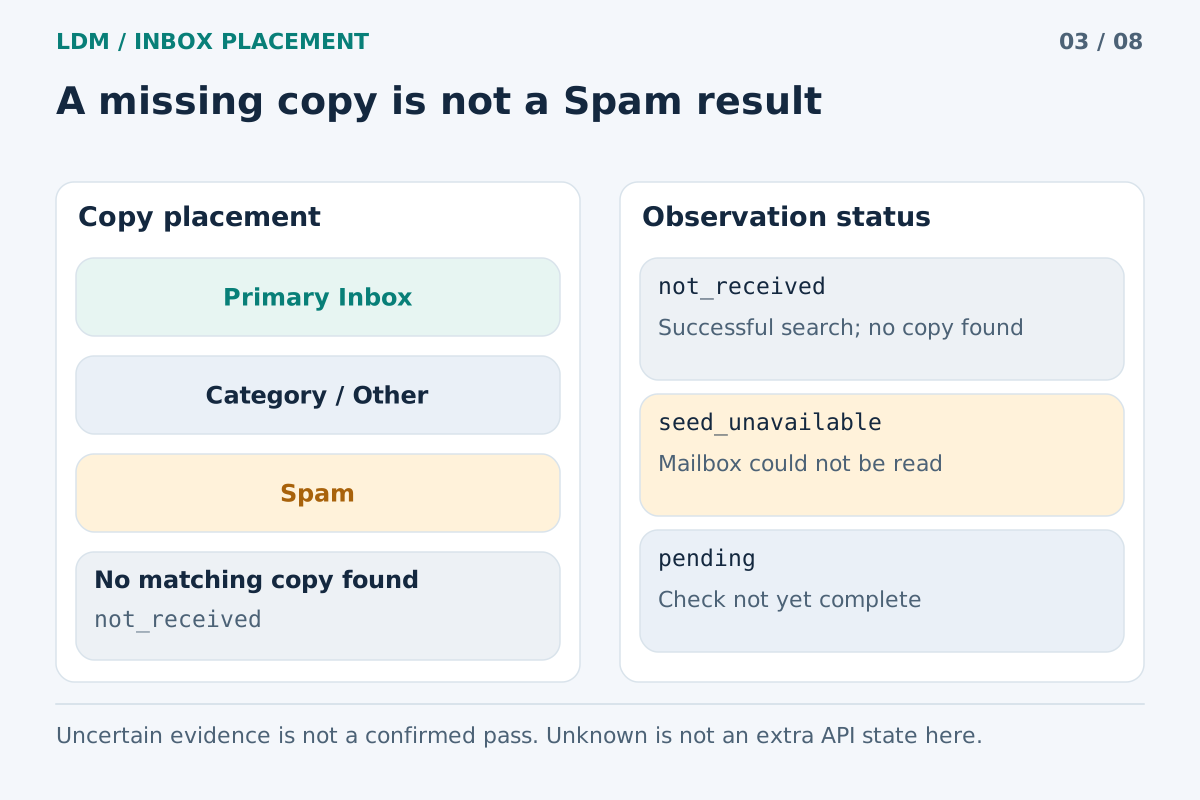
No copy found after a successful search differs from an unavailable mailbox or pending check.
What o:testmode means
Mailgun's test-mode guide states that setting o:testmode to yes or true makes Mailgun accept the message without sending it. The guide also states that test-mode messages are charged. Do not assume that a non-delivering test is a free substitute for every kind of integration testing.
The absence of an external copy is expected in this mode. Changing the to recipient to an LDM address does not change the delivery behavior of a request that still enables test mode.
Use this stage to examine the application's request construction and handling of Mailgun's response. Keep its result labeled as a processing test. A folder observation requires a separate message that is actually eligible for external delivery.
Preserve the Mailgun path you really use
Mailgun supports more than one way to submit a message. Its Messages API reference documents sending individual components for Mailgun to assemble and submitting an existing MIME message; SMTP is another supported route.
That distinction matters when designing a representative test. If your application constructs a MIME message with custom headers and attachments, a short hand-written API example is a different specimen. If the application uses a stored template with recipient data, testing unrelated inline HTML does not verify that template's output.
Record the sending domain, visible From address, actual submission method, template revision, and effective options. Record tracking choices as well: the API documents message-level tracking controls. Keep the baseline aligned with the intended production behavior before comparing an optional variant.
A controlled Mailgun-to-LDM workflow
1. Select one message type and prepare fixture data
Choose a specific email your application sends, such as a purchase receipt or a permission-based product update. Define whether the question concerns a new template, a route change, or the current baseline.
Use realistic, non-sensitive data that fills every relevant field. Review the final subject, HTML, text alternative, links, and attachments. Preserve unsubscribe links and headers required for that message type. Keep a record of the version being tested so a later edit cannot silently change the experiment.
2. Inspect the effective outgoing configuration
Check what the application actually submits, including overrides introduced by a wrapper, queue worker, or environment configuration. For an HTTP request, inspect whether o:testmode is present and enabled. For an SMTP implementation, review that implementation's supported delivery controls instead of treating an HTTP parameter as an SMTP setting.
Also check whether the application has scheduled the message for later. A message that has not reached its intended send time should not be diagnosed as a failed mailbox observation. Keep credentials out of captured payloads and reports.
3. Complete the non-delivering check
If test mode is part of your development process, run it and inspect the application's response handling first. Keep this result separate from the later live-send record.
Do not treat the identifier returned for this processing test as evidence that an external mailbox received the message. Save the mode alongside the identifier so anyone reviewing the record can understand what happened.
4. Create the LDM recipient set
Enter the actual sender at LDM Inbox Placement and obtain the current test addresses. Use a temporary recipient set for a finite job. Do not add those addresses to warmup programs, permanent mailing lists, or recurring application events.
Confirm that the sending account, domain, and recipient workflow permit the real send. An account restriction or suppression is a reason to investigate the permitted workflow, not to bypass the restriction for a test.
5. Send a fresh original through the live route
Prepare a separate bounded live job. For the HTTP workflow, remove the test-mode option from that job's request and verify the effective configuration before submission. Do not simply remove safeguards from every staging task.
Generate the message through the same rendering and submission path that the intended recipients would use. Send it directly to the LDM recipients; do not forward an already received copy. Retain the normal content, relevant headers, and required unsubscribe behavior.
Save the request time, application job reference, Mailgun response, and available message identifier. Keep any subsequent delivery evidence with that specific send.
6. Compare distinct forms of evidence
Read the sender-side record and the LDM result together, following the published LDM methodology. Missing or unknown does not establish Spam placement. Promotions and other secondary categories are received locations, separate from both primary Inbox and Spam.
The 24-hour observation window follows the same received copy rather than sending another email repeatedly. Preserve the times of confirmed measurements. A later unavailable observation does not erase an earlier finding or prove the copy's current folder.
Hypothetical example: a hidden test-mode override
Suppose a developer creates a live placement test, substitutes the seed recipients, and receives an accepted response. No copy appears. The visible application code does not mention test mode, so the team suspects the template's new links.
The team then inspects the effective request and finds that a development wrapper adds o:testmode=yes. In this hypothetical example, the non-delivering configuration explains the absence. There is no evidence that the new links caused a filtering decision.
After correcting the isolated test job, the team sends a fresh original. Imagine that one copy is found in Spam while another remains unknown because its mailbox could not be checked. Those are different results. Inspect the received copy's available evidence, and retain the observation gap explicitly rather than assigning both recipients the same diagnosis.
Make a comparison that can be interpreted
If the baseline exposes a concern, choose a narrow follow-up question. For example, compare a normal message with a separately documented version using different optional click tracking, while keeping the sender, text, and intended route stable. Preserve required unsubscribe functionality in both.
A difference provides a reason for further investigation; one pair of sends does not establish a universal rule about tracking or a platform. Time, recipient-specific treatment, and other conditions may also differ. Report the observed change and the test's limitations, rather than promising that one edit will improve every recipient's result.
Frequently asked questions
Does a Mailgun message ID prove the message was delivered?
No. Interpret the identifier with the request mode and subsequent sending evidence. It is a reference for tracing a message, not a certificate that an external copy reached a particular folder.
Can I leave test mode enabled and just change the recipient?
No. The delivery behavior must also match the intended experiment. Prepare a separate, permitted live request and verify its effective configuration before submitting it.
Should I switch from SMTP to HTTP for the seed test?
Only if HTTP is the route you intend to evaluate. Otherwise, keep the existing SMTP path and its content construction. Label a route comparison explicitly rather than treating the two implementations as automatically equivalent.
Does LDM replace Mailgun's sending records?
No. Sending records help establish what the application submitted and what happened during delivery. Mailbox observations add evidence about specific received copies. Use the two together when investigating a missing or unexpected result.
Should every result outside primary Inbox be counted as Spam?
No. Preserve the actual categories. A received copy in a secondary folder, a confirmed Spam copy, a completed search without a match, and a failed observation describe different situations.
Observe a real message after the processing test
Create an LDM test, send one bounded test set through your actual Mailgun route, and keep the mode, message identity, and observed folders in the same diagnostic record.